
Updated . A 4-minute read by the BundlePilot team at Boldnsmart.
BundlePilot is a Shopify app built for this. See it on the Shopify App Store.
Why the savings belong in the cart
12% of US shoppers who left a cart (not counting those just browsing) said they couldn’t see or calculate the total order cost up front (Baymard Institute). An itemized bundle line shows what the total is made of, and what the shopper saves on it.
Where the breakdown shows
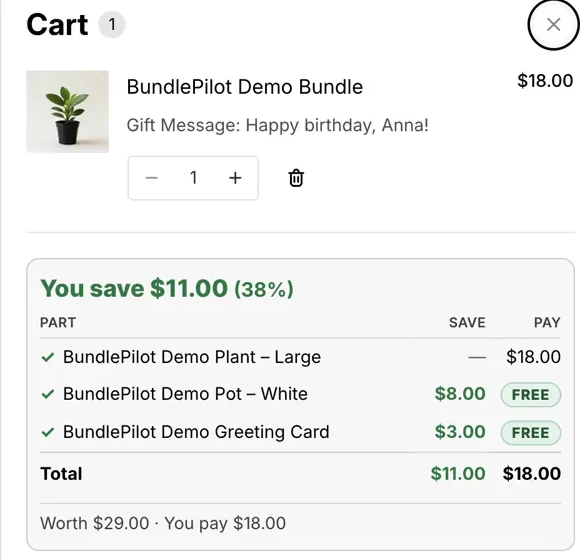
- Cart. The BundlePilot cart lines embed labels each part, with the bundle price and what was saved.
- Checkout. The parts are listed. The savings card on the checkout page needs Shopify Plus.
- Thank-you and order status pages. The savings card shows “You save” with the percentage, each part’s saving and price, a total, and what the bundle was worth, on all plans.
Set it up step by step
- Install BundlePilot
Install it from the Shopify App Store. The setup guide on Boldnsmart walks through the install and the theme editor.
- Turn on the cart lines embed
In the theme editor, turn on the BundlePilot cart lines app embed. The Setup page checks it on your live theme.
- Add the savings card
In the checkout editor, press Add app block and pick the savings card on the Thank you page, and the order-status version on the Order status page.
- Check a test order
Add a bundle to the cart, place a test order and open its order status page: the savings card lists each part with what it saves and what the shopper pays.
If the cart shows the bundle without its parts
Turn on the BundlePilot cart lines app embed. Some themes also need the embed’s advanced selector fields, such as the cart line container and the product title.